热榜卡片组件
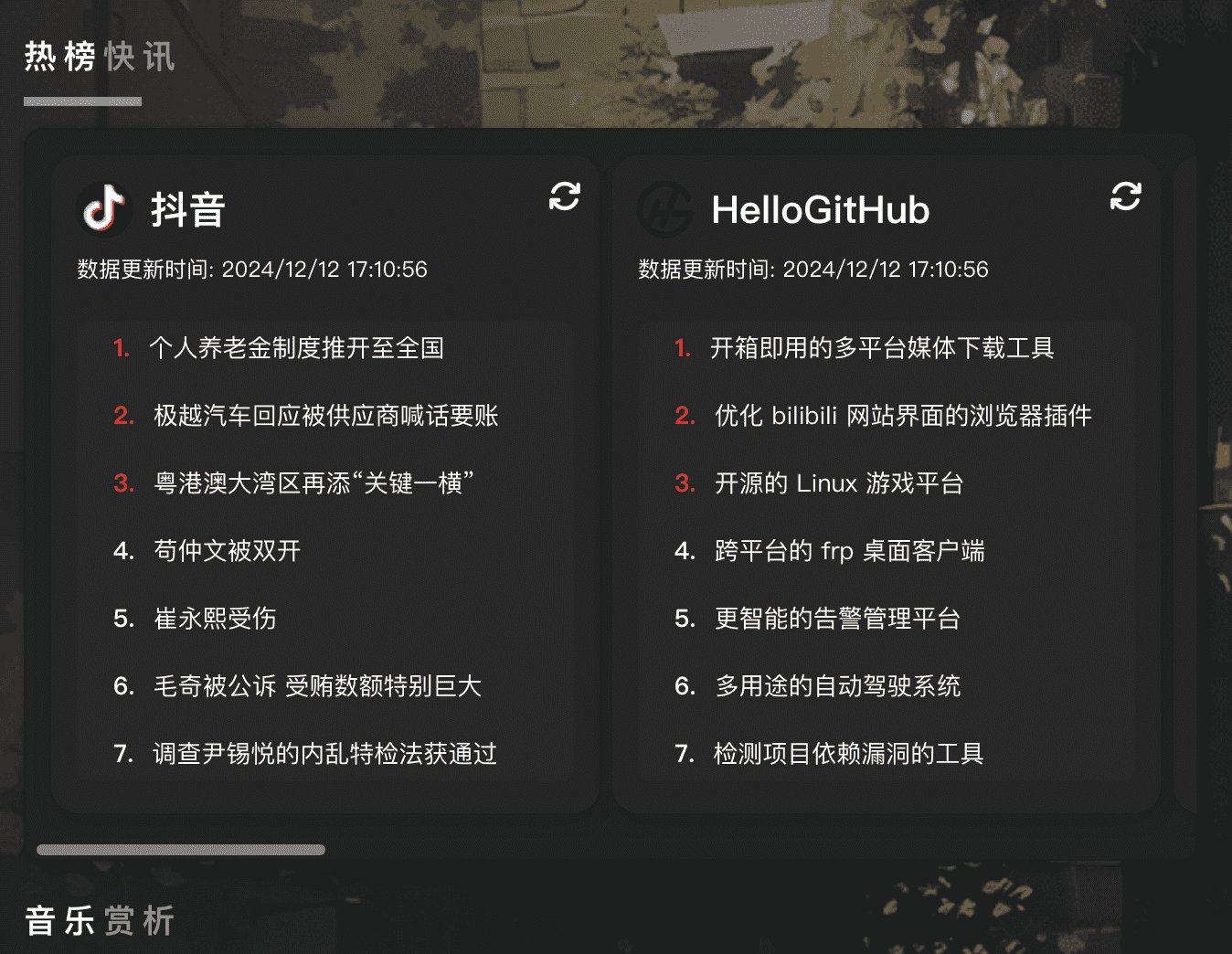
该组件是通过请求热榜API数据而展示在页面上的,引入效果已定制化处理,和主页其它组件保持一致性对于接口设置你可以选择加密和不加密的JS代码(接口请改为你自己的!)
如果你实在不想部署api时再来使用我的,已部署在云服务中的一个,可在公共服务页中找到该地址
API
项目部署:https://github.com/imsyy/DailyHotApi
✅ API部署【点击展开】
下方来自于项目仓库说明
Docker 部署
本地构建
# 构建
docker build -t dailyhot-api .

# 运行
docker run --restart always -p 6688:6688 -d dailyhot-api
# 或使用 Docker Compose
docker-compose up -d
在线部署
# 拉取
docker pull imsyy/dailyhot-api:latest

# 运行
docker run --restart always -p 6688:6688 -d imsyy/dailyhot-api:latest
手动部署
最直接的方式,您可以按照以下步骤将 DailyHotApi 部署在您的电脑、服务器或者其他任何地方
安装
git clone https://github.com/imsyy/DailyHotApi.git
cd DailyHotApi
然后再执行安装依赖
npm install复制 /.env.example 文件并重命名为 /.env 并修改配置
开发
npm run dev成功启动后程序会在控制台输出可访问的地址
编译运行
npm run build
npm run start
成功启动后程序会在控制台输出可访问的地址
Vercel 部署
本项目支持通过 Vercel 进行一键部署,点击下方按钮或前往 项目仓库 进行手动部署
Railway 部署
本项目支持使用 Railway 一键部署,请先将本项目 fork 到您的仓库中,即可使用一键部署。
Zeabur 部署
本项目支持使用 Zeabur 一键部署,请先将本项目 fork 到您的仓库中,即可使用一键部署。
组件引入
需要在html中引入hotindex.js、hotindex.css、crypto-js.js
<link rel="stylesheet" href="./css/hotindex.css">
 <script src="js/hotindex.js"></script>
 <script src="https://cdnjs.cloudflare.com/ajax/libs/crypto-js/3.1.9-1/crypto-js.js"></script>
在html中你想添加组件的地方引入
<!-- 热榜-->
            </br>
            <div class="work">
                <h2 class="chtitle"><span>热榜</span>快讯</span></h2>
                <div class="hotindex">
                    <div class="grid-container">
                        <div class="bg-orange-500 text-white p-4 rounded-lg shadow-lg hotcard" id="douyin">
                            <div class="header">
                              <img src="https://www.douyin.com/favicon.ico" alt="抖音">
                              <h2 class="text-lg font-bold">抖音</h2>
                            </div>
                            <p class="update-time">数据更新时间: -</p>
                            <span class="refresh-icon" onclick="refreshData('douyin')"><i class="fas fa-refresh"></i></span>
                            <div class="content">
                              <ol class="list-decimal pl-5" id="douyin-list">
                              </ol>
                            </div>
                          </div>
                          <div class="bg-indigo-500 text-white p-4 rounded-lg shadow-lg hotcard" id="hellogithub">
                            <div class="header">
                              <img src="https://hellogithub.com/favicon/android-icon-192x192.png" alt="HelloGitHub">
                              <h2 class="text-lg font-bold">HelloGitHub</h2>
                            </div>
                            <p class="update-time">数据更新时间: -</p>
                            <span class="refresh-icon" onclick="refreshData('hellogithub')"><i class="fas fa-refresh"></i></span>
                            <div class="content">
                              <ol class="list-decimal pl-5" id="hellogithub-list">
                              </ol>
                            </div>
                          </div>
                          <div class="bg-green-500 text-white p-4 rounded-lg shadow-lg hotcard" id="bilibili">
                            <div class="header">
                              <img src="https://www.bilibili.com/favicon.ico" alt="哔哩哔哩">
                              <h2 class="text-lg font-bold">哔哩哔哩</h2>
                            </div>
                            <p class="update-time">数据更新时间: -</p>
                            <span class="refresh-icon" onclick="refreshData('bilibili')"><i class="fas fa-refresh"></i></span>
                            <div class="content">
                              <ol class="list-decimal pl-5" id="bilibili-list">
                              </ol>
                            </div>
                          </div>
                      <div class="bg-blue-500 text-white p-4 rounded-lg shadow-lg hotcard" id="zhihu">
                        <div class="header">
                          <img src="https://static.zhihu.com/heifetz/favicon.ico" alt="知乎">
                          <h2 class="text-lg font-bold">知乎</h2>
                        </div>
                        <p class="update-time">数据更新时间: -</p>
                        <span class="refresh-icon" onclick="refreshData('zhihu')"><i class="fas fa-refresh"></i></span>
                        <div class="content">
                          <ol class="list-decimal pl-5" id="zhihu-list">
                          </ol>
                        </div>
                      </div>
                      <div class="bg-red-500 text-white p-4 rounded-lg shadow-lg hotcard" id="weibo">
                        <div class="header">
                          <img src="https://sina.com.cn/favicon.ico" alt="微博">
                          <h2 class="text-lg font-bold">微博</h2>
                        </div>
                        <p class="update-time">数据更新时间: -</p>
                        <span class="refresh-icon" onclick="refreshData('weibo')"><i class="fas fa-refresh"></i></span>
                        <div class="content">
                          <ol class="list-decimal pl-5" id="weibo-list">
                          </ol>
                        </div>
                      </div>
                      <div class="bg-purple-500 text-white p-4 rounded-lg shadow-lg hotcard" id="baidu">
                        <div class="header">
                          <img src="https://www.baidu.com/favicon.ico" alt="百度贴吧">
                          <h2 class="text-lg font-bold">百度贴吧</h2>
                        </div>
                        <p class="update-time">数据更新时间: -</p>
                        <span class="refresh-icon" onclick="refreshData('baidu')"><i class="fas fa-refresh"></i></span>
                        <div class="content">
                          <ol class="list-decimal pl-5" id="baidu-list">
                          </ol>
                        </div>
                      </div>
                      <div class="bg-yellow-500 text-white p-4 rounded-lg shadow-lg hotcard" id="toutiao">
                        <div class="header">
                          <img src="https://www.toutiao.com/favicon.ico" alt="今日头条">
                          <h2 class="text-lg font-bold">今日头条</h2>
                        </div>
                        <p class="update-time">数据更新时间: -</p>
                        <span class="refresh-icon" onclick="refreshData('toutiao')"><i class="fas fa-refresh"></i></span>
                        <div class="content">
                          <ol class="list-decimal pl-5" id="toutiao-list">
                          </ol>
                        </div>
                      </div>
                      <div class="bg-teal-500 text-white p-4 rounded-lg shadow-lg hotcard" id="v2ex">
                        <div class="header">
                          <img src="https://s2.loli.net/2024/12/12/kz5t8fuXBLl6cFi.jpg" alt="V2EX">
                          <h2 class="text-lg font-bold">V2EX</h2>
                        </div>
                        <p class="update-time">数据更新时间: -</p>
                        <span class="refresh-icon" onclick="refreshData('v2ex')"><i class="fas fa-refresh"></i></span>
                        <div class="content">
                          <ol class="list-decimal pl-5" id="v2ex-list">
                          </ol>
                        </div>
                      </div>
                    </div>
                   </div>
                </div>
需要引入的hotindex.css代码为
其中定制部分已做了注释说明
.hotindex {
  background-color: #222222;
  border: 1px solid #0c0c0c42;
  border-radius: 10px;
  box-shadow: 2px 2px 8px rgba(0, 0, 0, 0.3);
  z-index: 99;
  max-width: 100%;
  overflow-x: scroll;
  overflow-y: hidden;
  white-space: nowrap;
  position: relative;
}

/* Chrome, Safari and Opera */
.hotindex::-webkit-scrollbar {
  width: 12px;
}

.hotindex::-webkit-scrollbar-track {
  background: transparent;
}

.hotindex::-webkit-scrollbar-thumb {
  background-color: gray; /* 设置滚动条拇指(可拖动部分)的背景颜色为灰色 */
  border-radius: 6px; /* 圆角样式 */
}

/* Firefox */
.hotindex {
  scrollbar-width: thin; /* 设置滚动条的宽度为细 */
  scrollbar-color: gray transparent; /* 设置滚动条拇指颜色为灰色,轨道颜色为透明 */
}

/* IE and Edge */
.hotindex {
  -ms-overflow-style: -ms-autohiding-scrollbar; /* 自动隐藏滚动条,但仍可使用 */
}


.grid-container {
  display: flex; /* 修改为弹性布局 */
  flex-wrap: nowrap; /* 不允许换行 */
  gap: 0.5rem; /* 项目之间的间距 */
  padding: 1rem;
}

.hotcard {
  width: 300px; /* 固定宽度 */
  height: 300px; /* 固定高度 */
  border-radius: 15px;
  position: relative;
  padding: 20px;
  box-shadow: 0 6px 18px rgba(0, 0, 0, 0.1);
  transition: transform 0.3s, box-shadow 0.3s;
  background-color: #f1f5f9;
  color: #111827;
  flex: 0 0 auto; /* 确保每个卡片保持固定宽度 */
  overflow: hidden; /* 确保内容不会超出卡片 */
  word-wrap: break-word; /* 允许文字换行 */
}

.hotcard:hover {
  transform: translateY(-8px);
  box-shadow: 0 10px 30px rgba(0, 0, 0, 0.2);
}

.hotcard .header {
  display: flex;
  align-items: center;
  margin-bottom: 10px;
}

.hotcard .header img {
  width: 30px;
  height: 30px;
  margin-right: 10px;
  border-radius: 50%;
}

.hotcard h2 {
  margin: 0;
  font-size: 1.5rem;
  font-weight: 700;
}

.hotcard .update-time {
  font-size: 12px;
  color: #FFFFFF;
  margin-top: 5px;
}

.hotcard .refresh-icon {
  position: absolute;
  top: 10px;
  right: 10px;
  cursor: pointer;
  font-size: 18px;
  z-index: 1;
  color: #f3f4f8;
}

.hotcard .content {
  margin-top: 20px;
  text-align: left;
  height: calc(100% - 80px);
  overflow-y: auto;
  scrollbar-width: none;
  -ms-overflow-style: none;
}

.hotcard .content::-webkit-scrollbar {
  display: none;
}

.hotcard ol {
  margin: 0;
  padding: 0 10px;
  background: rgba(50, 46, 46, 0.33);
  backdrop-filter: blur(10px);
  border-radius: 8px;
  overflow: hidden;
  height: 100%;
  overflow-y: auto;
  scrollbar-width: none; /* 隐藏滚动条 - Firefox */
  -ms-overflow-style: none; /* 隐藏滚动条 - IE和Edge */
}

.hotcard ol::-webkit-scrollbar {
  display: none;
}

.hotcard ol li {
  margin-bottom: 8px;
  display: flex;
  align-items: center;
  cursor: pointer;
  font-size: 13.5px;
  padding: 5px 10px;
  transition: background-color 0.3s;
  text-align: left;
  overflow: hidden; /* 隐藏超过容器的内容 */
  white-space: nowrap; /* 防止文字换行 */
  text-overflow: ellipsis; /* 超出部分用省略号显示 */
  position: relative; /* 为绝对定位的伪元素提供参考 */
}

.hotcard ol li:hover {
  overflow: visible; /* 鼠标悬停时显示所有内容 */
  white-space: normal; /* 鼠标悬停时允许文字换行 */
  text-overflow: clip; /* 鼠标悬停时取消省略号 */
  z-index: 1; /* 确保悬停时内容在其他元素之上 */
}

.hotcard ol li:hover::after {
  content: '';
  position: absolute;
  top: 0;
  right: 0;
  bottom: 0;
  left: 0;
  pointer-events: none; /* 伪元素不响应鼠标事件 */
  background: linear-gradient(to right, rgba(255, 255, 255, 0) 0%, rgb(44, 53, 76) 100%); /* 渐变背景,模拟滚动效果 */
  z-index: -1; /* 伪元素在内容之下 */
}


.hotcard ol li::before {
  content: attr(data-index);
  margin-right: 10px;
  font-weight: bold;
}

.hotcard ol li:nth-child(-n+3)::before {
  color: red;
}

/* 颜色和样式类 */
.bg-blue-500 {
  background-color: #252627e6;
}

.bg-red-500 {
  background-color: #252627e6;
}

.bg-green-500 {
  background-color: #252627e6;
}

.bg-orange-500 {
  background-color: #252627e6;
}

.bg-purple-500 {
  background-color: #252627e6;
}

.bg-yellow-500 {
  background-color: #252627e6;
}

.bg-teal-500 {
  background-color: #252627e6;
}

.bg-indigo-500 {
  background-color: #252627e6;
}

.text-white {
  color: white;
}

.p-4 {
  padding: 1rem;
}

.rounded-lg {
  border-radius: 15px;
}

.shadow-lg {
  box-shadow: 0 6px 18px rgba(0, 0, 0, 0.1);
}

/* 媒体查询:屏幕宽度小于 768px 时生效 */
@media (max-width: 768px) {
  .hotcard {
    width: 225px; /* 缩小宽度 */
    height: 250px; /* 缩小高度 */
    padding: 15px; /* 缩小内边距 */
  }
}
hotindex.js代码为
不加密js
// 定义API接口
    const apiEndpoints = {
      zhihu: '你的域名/zhihu',
      weibo: '你的域名/sina',
      bilibili: '你的域名/bilibili',
      douyin: '你的域名/douyin',
      baidu: '你的域名/tieba',
      toutiao: '你的域名toutiao',
      v2ex: '你的域名/v2ex',
      hellogithub: '你的域名/hellogithub'
    };

    // 使用 fetch API 从不同的API端点请求数据
    function fetchData(url, target) {
      const updateTimeElement = document.getElementById(target).querySelector('.update-time');
      updateTimeElement.textContent = '数据更新时间: 加载中...';

      fetch(url)
        .then(response => {
          if (!response.ok) {
            throw new Error(`HTTP error! status: ${response.status}`);
          }
          return response.json();
        })
        .then(data => {
          console.log('Data received from', url, data);
          loadData(data.data, target);
          updateTimeElement.textContent = `数据更新时间: ${new Date().toLocaleString()}`;
          saveDataToLocalStorage(target, data.data); // 保存数据到本地存储
        })
        .catch(error => {
          console.error('Error fetching data from', url, error);
          updateTimeElement.textContent = `数据更新时间: 错误`;
          const list = document.getElementById(target + '-list');
          const li = document.createElement('li');
          li.textContent = `Error: ${error.message}`;
          list.appendChild(li);
        });
    }

    function loadData(data, target) {
      const list = document.getElementById(target + '-list');
      list.innerHTML = ''; // 清空列表
      if (Array.isArray(data)) {
        data.forEach((item, index) => {
          const li = document.createElement('li');
          li.textContent = item.title || 'No title';
          li.setAttribute('data-index', `${index + 1}.`);
          const url = (window.innerWidth > 768) ? item.url : item.mobileUrl || '#';
          li.addEventListener('click', () => {
            window.open(url, '_blank');
          });
          list.appendChild(li);
        });
      } else {
        const li = document.createElement('li');
        li.textContent = 'No data received';
        list.appendChild(li);
      }
    }

    function saveDataToLocalStorage(target, data) {
      localStorage.setItem(target, JSON.stringify(data));
    }

    function loadFromLocalStorage(target) {
      const storedData = localStorage.getItem(target);
      if (storedData) {
        const data = JSON.parse(storedData);
        const updateTimeElement = document.getElementById(target).querySelector('.update-time');
        updateTimeElement.textContent = `数据更新时间: ${new Date().toLocaleString()}`;
        loadData(data, target);
      }
    }

    function refreshData(target) {
      const url = apiEndpoints[target];
      if (url) {
        fetchData(url, target);
      } else {
        console.error('Unknown target:', target);
      }
    }

    // 页面加载时初始化数据
    document.addEventListener('DOMContentLoaded', () => {
      const targets = ['zhihu', 'weibo', 'bilibili', 'douyin', 'baidu', 'toutiao', 'v2ex', 'hellogithub'];
      targets.forEach(target => {
        loadFromLocalStorage(target);
        // 初始加载数据
        fetchData(apiEndpoints[target], target);
      });
    });

    // 每小时自动刷新页面
    setInterval(() => {
      location.reload();
    }, 3600000); // 3600000 毫秒 = 1 小时
AES加密JS
const encryptedApiEndpoints = {
  zhihu: '你的加密API',
  weibo: '你的加密API',
  bilibili: '你的加密API',
  douyin: '你的加密API',
  baidu: '你的加密API',
  toutiao: '你的加密API',
  v2ex: '你的加密API',
  hellogithub: '你的加密API'
};
function decryptApi(encryptedApi) {
  const decrypted = CryptoJS.AES.decrypt(encryptedApi, '加密的密码');
  return decrypted.toString(CryptoJS.enc.Utf8);
}
const apiEndpoints = {};
for (const [key, value] of Object.entries(encryptedApiEndpoints)) {
  apiEndpoints[key] = decryptApi(value);
}
function fetchData(url, target) {
  const updateTimeElement = document.getElementById(target).querySelector('.update-time');
  updateTimeElement.textContent = '数据更新时间: 加载中...';

  fetch(url)
    .then(response => {
      if (!response.ok) {
        throw new Error(`HTTP error! status: ${response.status}`);
      }
      return response.json();
    })
    .then(data => {
      console.log('Data received from', url, data);
      loadData(data.data, target);
      updateTimeElement.textContent = `数据更新时间: ${new Date().toLocaleString()}`;
      saveDataToLocalStorage(target, data.data);
    })
    .catch(error => {
      console.error('Error fetching data from', url, error);
      updateTimeElement.textContent = `数据更新时间: 错误`;
      const list = document.getElementById(target + '-list');
      const li = document.createElement('li');
      li.textContent = `Error: ${error.message}`;
      list.appendChild(li);
    });
}

function loadData(data, target) {
  const list = document.getElementById(target + '-list');
  list.innerHTML = ''; // 清空列表
  if (Array.isArray(data)) {
    data.forEach((item, index) => {
      const li = document.createElement('li');
      li.textContent = item.title || 'No title';
      li.setAttribute('data-index', `${index + 1}.`);
      const url = (window.innerWidth > 768) ? item.url : item.mobileUrl || '#';
      li.addEventListener('click', () => {
        window.open(url, '_blank');
      });
      list.appendChild(li);
    });
  } else {
    const li = document.createElement('li');
    li.textContent = 'No data received';
    list.appendChild(li);
  }
}

function saveDataToLocalStorage(target, data) {
  localStorage.setItem(target, JSON.stringify(data));
}

function loadFromLocalStorage(target) {
  const storedData = localStorage.getItem(target);
  if (storedData) {
    const data = JSON.parse(storedData);
    const updateTimeElement = document.getElementById(target).querySelector('.update-time');
    updateTimeElement.textContent = `数据更新时间: ${new Date().toLocaleString()}`;
    loadData(data, target);
  }
}

function refreshData(target) {
  const url = apiEndpoints[target];
  if (url) {
    fetchData(url, target);
  } else {
    console.error('Unknown target:', target);
  }
}

// 页面加载时初始化数据
document.addEventListener('DOMContentLoaded', () => {
  const targets = ['zhihu', 'weibo', 'bilibili', 'douyin', 'baidu', 'toutiao', 'v2ex', 'hellogithub'];
  targets.forEach(target => {
    loadFromLocalStorage(target);
    // 初始加载数据
    fetchData(apiEndpoints[target], target);
  });
});

// 每小时自动刷新页面
setInterval(() => {
  location.reload();
}, 3600000); // 3600000 毫秒 = 1 小时
除了接口本身的限制外,我还增加了自动1小时刷新数据,避免每次进入页面都请求,当然,你可以点击刷新图标来获取最新的请求,此外,如想配置更多卡片及热榜数据请查看其它API接口/all
AES加密,你可以使用:https://tool.oschina.net/encrypt
示例代码
const encryptedApiEndpoints = {
  zhihu: '你的加密api接口'
};
function decryptApi(encryptedApi) {
  const decrypted = CryptoJS.AES.decrypt(encryptedApi, '加密密码');
  return decrypted.toString(CryptoJS.enc.Utf8);
}
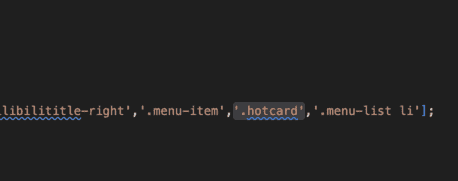
滑动音效添加
找到sound.js
在177行添加'.hotcard'即可
⚠️注意
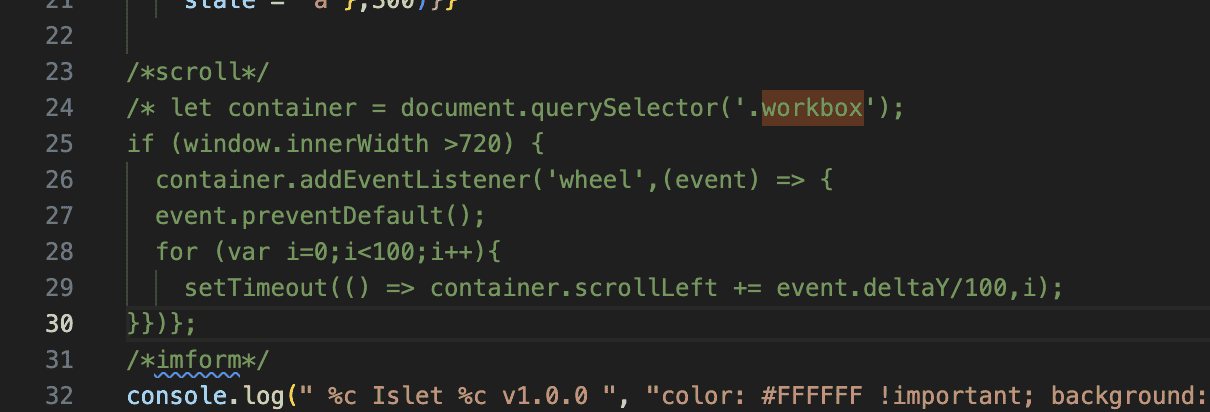
为了保持样式统一及逻辑统一,我修改了网站合集的滑动查看逻辑和热榜组件保持一致
修改为: 找到main.js,将下面第23行到30行代码注释或删除即可(此代码是为了更符合原生手机端滑动操作,不过目前是没有必要有的)